All Stories

Sunday, 2 March 2014


How To Root Nokia X XL And X+

Nokia was always with Symbian and a short time before they totally changed to Windows Phone but now they did a totally new work. Nokia launched a new smartphone by the name of Nokia X which is based on Android and it is a low range smartphone from Nokia. The first Android from Nokia. We are now rooting this smartphone to enable more of it features and have root access to the OS.

Before You Begin: 
1. You should know about Rooting your smartphone go to: Root Android Smartphone

Downloads:
1. Framaroot.apk

Installation:
1. Download the above apk file.
2. Move it to the internal storage of your device.
3. Install the apk file and Open Framaroot app in the menu.
4. Choose SuperSU from the above option menu and Choose Gandalf if it doesnt worked try another.
5. After selecting exploit you will see a success message. Your device is now rooted.


How To Root Nokia X XL And X+


How To Root Nokia X XL And X+

Nokia was always with Symbian and a short time before they totally changed to Windows Phone but now they did a totally new work. Nokia launched a new smartphone by the name of Nokia X which is based on Android and it is a low range smartphone from Nokia. The first Android from Nokia. We are now rooting this smartphone to enable more of it features and have root access to the OS.

Before You Begin: 
1. You should know about Rooting your smartphone go to: Root Android Smartphone

Downloads:
1. Framaroot.apk

Installation:
1. Download the above apk file.
2. Move it to the internal storage of your device.
3. Install the apk file and Open Framaroot app in the menu.
4. Choose SuperSU from the above option menu and Choose Gandalf if it doesnt worked try another.
5. After selecting exploit you will see a success message. Your device is now rooted.


Posted at 01:17 |  by John Peter

Sony Xperia Tablet Z SGP321 Official 4.3 Jellybean Firmware

Manufacturer: Sony
Model: Xperia Tablet Z SGP321
Android Version: 4.3 Jellybean
Firmware: 10.4.1.B.0.101
Status: Official
Size:  832 MB
(click here to download)

Sony Xperia Tablet Z SGP321 Official 4.3 Firmware


Sony Xperia Tablet Z SGP321 Official 4.3 Jellybean Firmware

Manufacturer: Sony
Model: Xperia Tablet Z SGP321
Android Version: 4.3 Jellybean
Firmware: 10.4.1.B.0.101
Status: Official
Size:  832 MB
(click here to download)

Posted at 01:03 |  by John Peter

Saturday, 1 March 2014


Sony Xperia T LT30 Official 4.3 Jellybean Firmware

Manufacturer: Sony
Model: Xperia T LT30
Android Version: 4.3 Jellybean
Firmware: 9.2.A.0.295
Status: Official
Size: 731 MB
(click here to download)

Sony Xperia T LT30 Official 4.3 Firmware


Sony Xperia T LT30 Official 4.3 Jellybean Firmware

Manufacturer: Sony
Model: Xperia T LT30
Android Version: 4.3 Jellybean
Firmware: 9.2.A.0.295
Status: Official
Size: 731 MB
(click here to download)

Posted at 20:57 |  by John Peter

Samsung Galaxy S4 DUOS GT-I9508 Official 4.3 Firmware

Manufacturer: Samsung
Model: Galaxy S4 DUOS GT-I9508
Android Version: Android 4.3 Jellybean
Version: I9508ZMUEMK6
Changelist: 2106452
Build Date: 19/11/2013
Status: Official
Size: 1.4 GB
(click here to download)


If you Want to learn Flashing A Samsung Firmware go to: Learn How To Flash Samsung Firmware on Samsung Devices

Samsung Galaxy S4 DUOS GT-I9508 Official 4.3 Firmware


Samsung Galaxy S4 DUOS GT-I9508 Official 4.3 Firmware

Manufacturer: Samsung
Model: Galaxy S4 DUOS GT-I9508
Android Version: Android 4.3 Jellybean
Version: I9508ZMUEMK6
Changelist: 2106452
Build Date: 19/11/2013
Status: Official
Size: 1.4 GB
(click here to download)


If you Want to learn Flashing A Samsung Firmware go to: Learn How To Flash Samsung Firmware on Samsung Devices

Posted at 09:56 |  by John Peter

How To Root Samsung Galaxy Tab 3 8.0 SM-T315T LTE


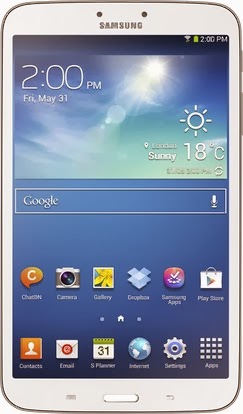
Samsung Galaxy Tab 3 8.0 is an 8" slim tablet from SAMSUNG, it is powered by Android 4.2.2 Jellybean, 5 Megapixel camera, 1.5 Ghz of CPU, 1.5 GB Of RAM and 4450 mAh of Battery. It is pretty good tablet in terms of price and functionalities. By rooting this tablet you will have full access on the OS, also you will be able to customize its default theme and UI to the custom made themes and UIs. Get ready To Root Samsung Galaxy Tab 3 8.0 SM-T315T LTE.


Before You Begin: (must do)
1. Samsung USB Drivers must be installed on your PC, if not go to: Samsung USB Drivers

Downloads:
1. CF-Auto-Root.zip (download link is at the bottom of page)

Installation:
1. Download the above zip file.
2. Extract it and Open Odin.
3. Now restart your tablet in Download mode, by pressing and holding Volume Down + Home Button + Power Button at the same time for some short time, dont leave the buttons until a Warning screen appears, when Warning screen appears leave all buttons and press the Volume Up button to continue in download mode.
4. In download mode connect your device to PC via USB cable.
5. Added! message will be shown in the message box of Odin, that means the device is properly connected. If not so install drivers properly.
6. Now click on PDA and Choose that CF-Auto-Root........tar.md5 file and click Start.

7. Your device will be successfully rooted. And Enjoy.

How To Root Samsung Galaxy Tab 3 8.0 SM-T315T LTE


How To Root Samsung Galaxy Tab 3 8.0 SM-T315T LTE


Samsung Galaxy Tab 3 8.0 is an 8" slim tablet from SAMSUNG, it is powered by Android 4.2.2 Jellybean, 5 Megapixel camera, 1.5 Ghz of CPU, 1.5 GB Of RAM and 4450 mAh of Battery. It is pretty good tablet in terms of price and functionalities. By rooting this tablet you will have full access on the OS, also you will be able to customize its default theme and UI to the custom made themes and UIs. Get ready To Root Samsung Galaxy Tab 3 8.0 SM-T315T LTE.


Before You Begin: (must do)
1. Samsung USB Drivers must be installed on your PC, if not go to: Samsung USB Drivers

Downloads:
1. CF-Auto-Root.zip (download link is at the bottom of page)

Installation:
1. Download the above zip file.
2. Extract it and Open Odin.
3. Now restart your tablet in Download mode, by pressing and holding Volume Down + Home Button + Power Button at the same time for some short time, dont leave the buttons until a Warning screen appears, when Warning screen appears leave all buttons and press the Volume Up button to continue in download mode.
4. In download mode connect your device to PC via USB cable.
5. Added! message will be shown in the message box of Odin, that means the device is properly connected. If not so install drivers properly.
6. Now click on PDA and Choose that CF-Auto-Root........tar.md5 file and click Start.

7. Your device will be successfully rooted. And Enjoy.

Posted at 09:28 |  by John Peter
How To Root Samsung Galaxy Tab Pro 10.1 SM-T520

Samsung Galaxy Tab Pro 10.1 SM-T520 is another tablet with note type design and have some great features along with latest Android Firmware, upgraded camera, upgraded CPU and RAM etc. Now we are rooting this tablet to have full access on the OS and also we will be able to enhance the performance of tablet. Get ready to Root Samsung Galaxy Tab Pro 10.1 SM-T520

Before You Begin: (must do)
1. Samsung USB Drivers must be installed on your PC, if not go to: Samsung USB Drivers

Downloads:
1. CF-Auto-Root.zip (download link is at the bottom of page)

Installation:
1. Download the above zip file.
2. Extract it and Open Odin.
3. Now restart your tablet in Download mode, by pressing and holding Volume Down + Home Button + Power Button at the same time for some short time, dont leave the buttons until a Warning screen appears, when Warning screen appears leave all buttons and press the Volume Up button to continue in download mode.
4. In download mode connect your device to PC via USB cable.
5. Added! message will be shown in the message box of Odin, that means the device is properly connected. If not so install drivers properly.
6. Now click on PDA and Choose that CF-Auto-Root........tar.md5 file and click Start.

7. Your device will be successfully rooted. And Enjoy.

How To Root Samsung Galaxy Tab Pro 10.1 SM-T520

How To Root Samsung Galaxy Tab Pro 10.1 SM-T520

Samsung Galaxy Tab Pro 10.1 SM-T520 is another tablet with note type design and have some great features along with latest Android Firmware, upgraded camera, upgraded CPU and RAM etc. Now we are rooting this tablet to have full access on the OS and also we will be able to enhance the performance of tablet. Get ready to Root Samsung Galaxy Tab Pro 10.1 SM-T520

Before You Begin: (must do)
1. Samsung USB Drivers must be installed on your PC, if not go to: Samsung USB Drivers

Downloads:
1. CF-Auto-Root.zip (download link is at the bottom of page)

Installation:
1. Download the above zip file.
2. Extract it and Open Odin.
3. Now restart your tablet in Download mode, by pressing and holding Volume Down + Home Button + Power Button at the same time for some short time, dont leave the buttons until a Warning screen appears, when Warning screen appears leave all buttons and press the Volume Up button to continue in download mode.
4. In download mode connect your device to PC via USB cable.
5. Added! message will be shown in the message box of Odin, that means the device is properly connected. If not so install drivers properly.
6. Now click on PDA and Choose that CF-Auto-Root........tar.md5 file and click Start.

7. Your device will be successfully rooted. And Enjoy.

Posted at 09:01 |  by John Peter

How To Root Samsung Galaxy Tab Pro 8.4 SM-T320

As Samsung gives a large bundle of choices for consumer. It is started from 2" upto 13" Tablets and smartphones. This time we have a Galaxy Tab Pro 8.4 SM-T320 with having of great design and plenty of features. We are now rooting this device to have full access on the Android OS and customize it with our custom created apps and mods. Get ready to Root Samsung Galaxy Tab Pro 8.4 SM-T320.

Before You Begin: (must do)
1. Samsung USB Drivers must be installed on your PC, if not go to: Samsung USB Drivers

Downloads:
1. CF-Auto-Root.zip (download link is at the bottom of page)

Installation:
1. Download the above zip file.
2. Extract it and Open Odin.
3. Now restart your tablet in Download mode, by pressing and holding Volume Down + Home Button + Power Button at the same time for some short time, dont leave the buttons until a Warning screen appears, when Warning screen appears leave all buttons and press the Volume Up button to continue in download mode.
4. In download mode connect your device to PC via USB cable.
5. Added! message will be shown in the message box of Odin, that means the device is properly connected. If not so install drivers properly.
6. Now click on PDA and Choose that CF-Auto-Root........tar.md5 file and click Start.
7. Your device will be successfully rooted. And Enjoy.

How To Root Samsung Galaxy Tab Pro 8.4 SM-T320


How To Root Samsung Galaxy Tab Pro 8.4 SM-T320

As Samsung gives a large bundle of choices for consumer. It is started from 2" upto 13" Tablets and smartphones. This time we have a Galaxy Tab Pro 8.4 SM-T320 with having of great design and plenty of features. We are now rooting this device to have full access on the Android OS and customize it with our custom created apps and mods. Get ready to Root Samsung Galaxy Tab Pro 8.4 SM-T320.

Before You Begin: (must do)
1. Samsung USB Drivers must be installed on your PC, if not go to: Samsung USB Drivers

Downloads:
1. CF-Auto-Root.zip (download link is at the bottom of page)

Installation:
1. Download the above zip file.
2. Extract it and Open Odin.
3. Now restart your tablet in Download mode, by pressing and holding Volume Down + Home Button + Power Button at the same time for some short time, dont leave the buttons until a Warning screen appears, when Warning screen appears leave all buttons and press the Volume Up button to continue in download mode.
4. In download mode connect your device to PC via USB cable.
5. Added! message will be shown in the message box of Odin, that means the device is properly connected. If not so install drivers properly.
6. Now click on PDA and Choose that CF-Auto-Root........tar.md5 file and click Start.
7. Your device will be successfully rooted. And Enjoy.

Posted at 08:28 |  by John Peter
Blogging World. Proudly Powered by Blogger.
back to top